Video for Every Listing Was Economically Impossible. Then It Wasn't.
How I turned full-catalog video coverage from a $33K impossibility into a $26 reality by building an automated render farm on ephemeral cloud compute.
TL;DR — Styllus Imobiliaria paid an outsourced agency $20-25 per video, which meant most listings never got a video at all. Full-catalog coverage for 1,500+ listings would cost $30K-$37.5K — a budget nobody would approve. I designed and built an automated rendering platform on ephemeral cloud compute that brought the cost to ~$0.02/video, making full-catalog generation cost ~$26 instead of $30K+. Result: a capability that never existed before — every listing gets a video, same-day.
Most Listings Had No Video. That Was the Problem.
Property owners expected a polished video within hours of a realtor filming their home. These were templated listing videos — branded overlays on realtor-shot footage with property details, neighborhood context, and background music. That expectation was set during the listing appointment — and then broken, repeatedly. Styllus Imobiliaria outsourced video editing to an agency at $20-25 per video. At that price, only premium listings got videos. The other 1,400+ active listings? Nothing.
I was the sole product and technical lead on this initiative — I owned discovery, architecture, engineering, and stakeholder management end to end.
The math was the constraint. At $20-25 per video, generating videos for the full catalog of 1,500+ listings would cost $30,000-$37,500. That number was never a real budget proposal — it was the theoretical price tag that proved full-catalog video coverage was impossible under the current model. So the agency cherry-picked which properties deserved videos, clients with unselected listings got nothing, and the capability that buyers and renters valued most was artificially scarce.
This was not a cost-saving opportunity. It was a capability-unlocking problem. The question was not “how do we spend less on videos?” but “how do we make video coverage for every listing economically rational?”
Discovery: The Bottleneck Was Not Creative
I started with discovery calls, not architecture diagrams.
I interviewed property owners — sellers and landlords — about their expectations after a realtor filmed their property. The pattern was consistent: same-day delivery. That expectation was being set in person and then broken by the agency’s turnaround time. This gap was a direct source of client dissatisfaction.
I interviewed realtors who had published videos before. They confirmed what the data suggested: the external agency was the bottleneck. Realtors submitted raw footage and waited — sometimes days, sometimes weeks — with no visibility into when the edited version would arrive. Some had stopped requesting videos altogether because the process was too unreliable.
I observed the manual workflow firsthand: a realtor films on their phone, sends footage to a receptionist, the receptionist emails it to the agency, the agency edits it on their own schedule, sends it back, someone reviews it, and finally it gets uploaded to YouTube. Six handoffs for a 60-second video.
The critical insight from this research: the editing work itself was formulaic. Every video followed the same template — raw footage, branded overlay with property details, background music, company logo. The agency was not doing creative work. They were doing repetitive compositing at $20-25 per unit. That unit economics problem was the entire constraint.
The Hypothesis
If we could automate the video compositing process in-house, we could reduce per-video cost enough to make full-catalog video generation economically viable — while simultaneously eliminating the turnaround bottleneck that frustrated clients.
The hypothesis had two parts, and both mattered. Cost alone was not enough — even cheap videos are useless if they take weeks. Speed alone was not enough — same-day turnaround means nothing if you can only afford 50 videos. The product had to solve both simultaneously.
Alternatives Considered
Before committing to building a render farm, I evaluated four alternatives.
Switching editing agencies — but the problem was structural, not vendor-specific. Any agency charging per-video would hit the same scale ceiling. A different vendor might deliver faster, but the unit economics that made full-catalog coverage impossible would remain unchanged.
Hiring an internal media team — eliminated quickly. The work was repetitive compositing, not creative editing. Hiring full-time editors for formulaic template work meant paying creative salaries for non-creative output. The cost structure would still not support 1,500+ videos.
Cloud video APIs — I evaluated Cloudinary, Shotstack, and Creatomate. Cloudinary’s credit model charges 4 credits per second for HD video, making it roughly $400/video — designed for image transformations, not video at volume. Shotstack ($0.18-$0.49/video) and Creatomate ($0.48/video) were better — but even at Shotstack’s highest credit tier (25,000 credits, $0.04/min), a 4.5-minute video costs $0.18, still 10x more expensive than what I believed was achievable with direct compute. They also meant giving up control over the rendering pipeline — templating, quality, turnaround would all depend on a third party’s constraints.
GPU-based cloud rendering (AWS/GCP) — the natural assumption for video processing. I benchmarked it. GPU Docker images with NVIDIA/CUDA were 1GB+, CI/CD was slow, and performance was not meaningfully better for FFmpeg compositing workloads (overlaying a PNG on footage, mixing audio). GPU makes sense for transcoding or ML inference, not for this.
The approach I chose — CPU-based ephemeral containers on RunPod — was driven by three product requirements: cost low enough to make full-catalog coverage trivial, same-day turnaround capability, and operational simplicity for a team without dedicated infrastructure engineers.
Designing the Platform
The system has two components: a web interface where the operations team manages the video lifecycle, and a render farm where the actual compositing happens.
flowchart TD
    A["Realtor films property"] --> B["Realtor uploads via rotating token link"]
    B --> C["System auto-generates overlay PNG"]
    C --> D["Admin reviews & batches into cart"]
    D --> E["Render farm composites video"]
    E --> F["Admin reviews side-by-side"]
    F --> G{"Approve?"}
    G -->|Yes| H["YouTube auto-upload"]
    G -->|Redo| E
    G -->|Deny| I["Job archived"]
Zero-Friction Upload
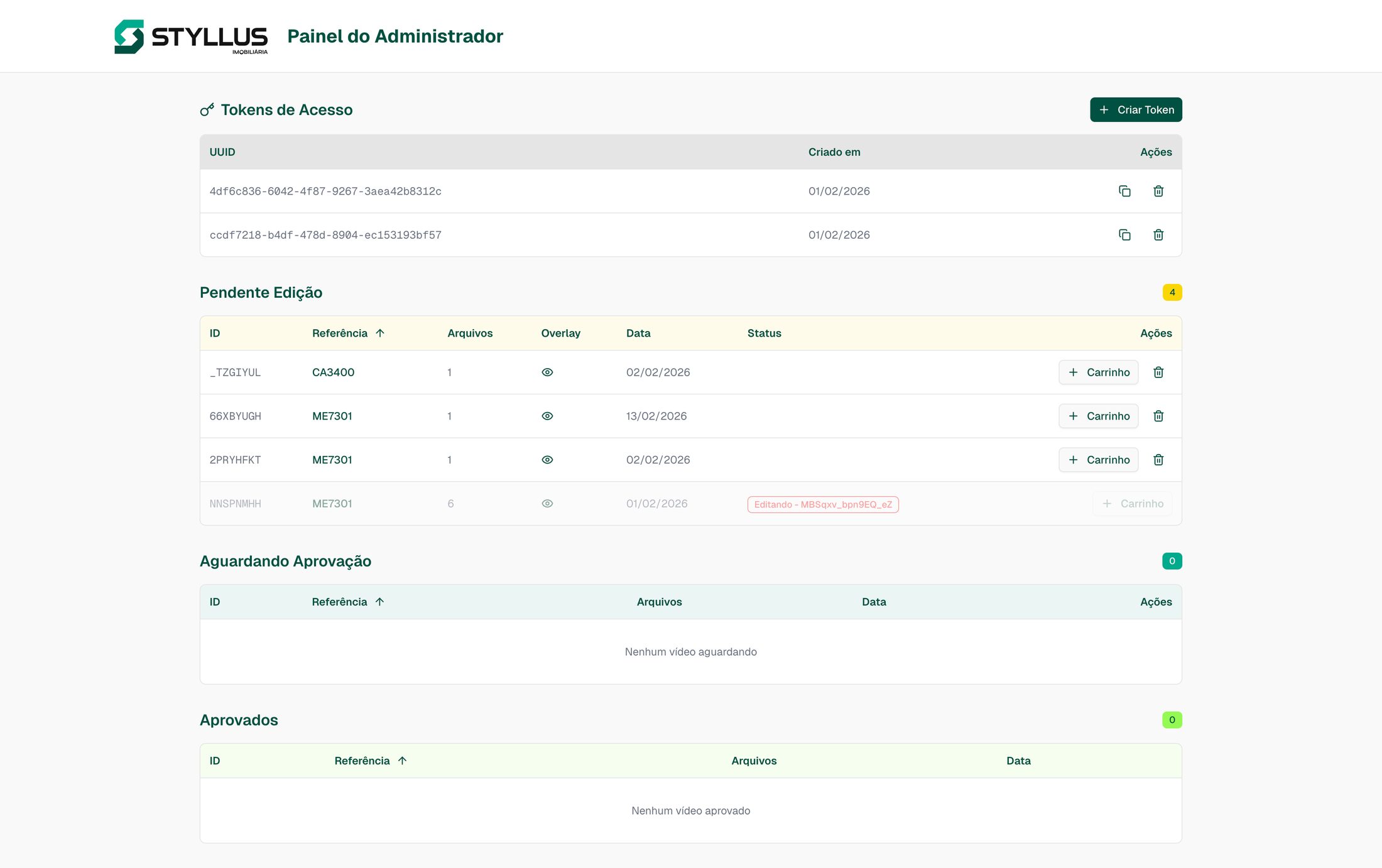
The first product constraint was that uploading had to be simpler than the old process of emailing files to an agency. Before the platform, realtors uploaded raw footage to Google Drive — and Google Drive kept hitting storage limits because video files averaged 1.5GB each. Every time storage ran out, it was an operational disruption. The platform eliminated that bottleneck entirely by letting realtors upload directly to Backblaze B2 via the platform’s API, with multi-part upload support for large files.
The flow works in two layers. Receptionists have login credentials to the platform. Inside the secure area, they see two token-authenticated upload links that rotate weekly. They share these links with realtors who are out filming at property sites. Realtors use the link to upload raw video through a drag-and-drop interface — no account required, no login, just the link and a property reference code search. Weekly link rotation handles security without adding friction for field staff. The moment a video is uploaded, the platform automatically generates a branded overlay PNG with the property’s details — reference code, bedrooms, bathrooms, area, neighborhood — pulled from the existing listings API. No manual data entry.
Two Rendering Modes, Shaped by User Feedback
The default mode is a cron job that runs twice daily, picking up all pending videos and processing them in bulk. Batching optimizes cost — the system auto-scales instance size based on job count, amortizing machine startup across many jobs instead of spinning up a full instance for a single video.
But when I went back to the realtors with this, a handful flagged a gap. Some premium listings needed immediate turnaround — a client waiting for their video that day, a high-value property going live that afternoon. For those cases, receptionists have the ability to add a specific job to a cart and spin up a dedicated render instance immediately. It is the same mental model as an e-commerce cart: select the jobs, click render, and a machine starts processing within minutes.
The two modes serve different product needs. Regular batching handles volume efficiently. Priority carts handle urgency. Both exist because the users told me they needed them.
The Approval Workflow: Designing for Trust
This was a trust-building decision, not a technical necessity. The operations team was transitioning from a human-reviewed process to machine-generated output. Jumping straight to fully automated publishing would have created resistance.
The review page shows the original raw footage and the rendered output side-by-side. Admins approve, deny, or request a redo. Approved videos get presigned download URLs and automatically upload to YouTube — completing the lifecycle from filming to published video without a third-party tool. This workflow was designed to be temporary — as confidence builds, the approval step can be removed. But launching with it was essential for adoption.
The trust arc played out over months. We started with a 7-day review window — the operations team wanted a full week to evaluate whether machine-generated output met their standards. As confidence grew, we reduced it to 3 days, then to 1 day, and it currently sits at 24 hours. The failure rate on rendered videos is abysmally low — the system produces consistent, correct output. But we kept the review window anyway. The team wants that sense of control, and respecting that preference is a better product decision than optimizing for throughput. The system is capable of fully automated publishing today. The 24-hour window exists because user autonomy matters more than system capability — and maintaining it has cost us nothing in adoption while preserving the trust that made adoption possible in the first place.
Infrastructure as Product Decisions
Every infrastructure choice was driven by the cost model that needed to make full-catalog coverage trivial.
RunPod over AWS/GCP: RunPod’s API made it trivial to spin up and terminate containers programmatically. Predictable per-hour pricing on spot instances, multiple machine sizes to match job volume, and no long-term commitments. AWS and GCP offered more services but more complexity — and for a single-purpose render worker, simplicity won. I evaluated both and chose the platform where the operational overhead was lowest.
Backblaze B2 over S3/GCS: Video files average 1.5GB each. The platform constantly uploads raw footage, downloads it for rendering, uploads rendered output, and eventually deletes everything. B2 charges zero egress fees at $6/TB storage. With this volume of data movement, S3 egress charges would have been a significant and unpredictable cost multiplier.
CPU over GPU: I ran benchmarks with our actual compositing tasks — overlaying a PNG, mixing audio, encoding H.264 — and CPU rendered at ~155 videos per hour per instance. Fast enough. CPU Docker images were ~200MB vs 1GB+ for GPU/CUDA, CI/CD was faster, and operational complexity dropped substantially. The performance delta did not justify the infrastructure cost or complexity.
flowchart TD
    A["Startup checks"] --> B["Fetch job queue"]
    B --> C["Download video + overlay + audio"]
    C --> D["FFmpeg composite"]
    D --> E["Upload to B2"]
    E --> F["Report completion"]
    F --> G{"More jobs?"}
    G -->|Yes| B
    G -->|No| H["Self-terminate pod"]
Each render worker is a one-shot container. It starts, pulls jobs from the queue, processes them, and self-terminates. No long-running infrastructure. No idle costs. Failed jobs automatically revert to pending and get picked up by the next worker. The 7-10% spot instance failure rate resolves itself through automatic re-rendering — the operations team never sees retries, just completed videos.
What We Chose Not to Build
- A video editor in the browser. Letting admins trim clips or adjust overlays would have tripled scope without proportional value. The compositing template handles 95%+ of cases — building an editor optimized for the 5% was not worth delaying the 95%.
- Multi-template support at launch. The system renders one video style. Future templates are architecturally supported but not worth the scope expansion for v1 — one good template that ships beats three templates that do not.
- Real-time rendering progress. Workers log progress to stdout, but there is no live progress bar in the UI. The batch-and-review model means admins check back when the job is done. Polling for completion status was sufficient.
Results
| Provider | Cost/Video | 1,500 Videos |
|---|---|---|
| Outsourced Agency | $20.00-$25.00 | $30,000-$37,500 |
| Cloudinary | ~$400.00 | ~$600,000 |
| Shotstack | $0.18-$0.49 | $270-$735 |
| Creatomate | $0.48 | $720 |
| Styllus Platform | ~$0.02 | ~$26 |
Cost assumptions: average video duration 4.5 min, 1080p H.264 at 10Mbps. The ~$0.02/video figure includes pod startup, asset download/upload, FFmpeg compositing, rendered file upload, and 7-10% spot instance re-render overhead. Excludes human review/approval time. Vendor estimates based on public pricing at time of evaluation.
Production
Since launch, the platform has produced 270+ videos through normal operations and ramped to upwards of 100 videos per month. Same-day turnaround — videos ready within hours of filming, not days or weeks — replaced the agency dependency entirely. At ~$0.02/video vs $20-25/video, full-catalog video coverage went from economically impossible to trivial. This was the entire point: not saving money on an existing expense, but creating a capability that never existed.
Scalability Validation
To validate that full-catalog coverage was genuinely achievable, I benchmarked the system at 1,500 videos in a single day — scaling to 60 parallel instances with <3% final transient job failures — primarily spot instance interruptions, auto-retried successfully with no user-visible impact. Even at Shotstack’s best volume tier, the platform is 10x cheaper.
Before handoff, I created usage manuals and full documentation on the brokerage’s centralized internal documentation portal — the same portal used to onboard new employees on all internal platforms and services.
Lessons and Reflections
The cost analysis was the most important artifact I produced. Not the code, not the architecture — the spreadsheet. Leadership had a longstanding relationship with the editing agency. Showing that full-catalog coverage was ~$26 versus the theoretical $33,750 made the decision self-evident. The transferable PM principle: when asking stakeholders to change a vendor relationship, abstract arguments about efficiency fail. A concrete cost model with specific numbers succeeds. I now lead every build-vs-buy conversation with unit economics before discussing architecture.
Design for trust during transitions. The approval workflow exists because the operations team needed to feel in control of machine-generated output. The side-by-side review page was not about catching rendering errors (transient failures auto-retry transparently). It was about giving people confidence that automation was producing the quality they expected. The lesson generalizes: when you automate a human workflow, the first version should make the human a reviewer, not remove them entirely. Trust is earned incrementally. The fastest way to kill adoption is to skip the trust-building phase.
Benchmark assumptions before committing to infrastructure. The GPU vs. CPU decision saved significant complexity and cost, but only because I ran actual benchmarks with our workload instead of accepting the conventional wisdom that “video processing needs GPUs.” Five hours of benchmarking eliminated months of GPU-related complexity. I now treat every infrastructure assumption as a hypothesis — the kind that needs data, not instinct.
The platform is now part of the agency’s daily operations. The next phase is removing the approval step for routine videos and expanding template options — but the foundation handles both without architectural changes. The larger outcome is simpler: every listing can have a video now. That was never true before.